Features

Less inbox. More done.

One place for every conversation, an alert the moment it matters, and a reply that's already written.

Unified inbox

Every conversation, one calm list

Ekam pulls messages from email, team chat and social DMs into one feed, newest first, with the channel clearly marked. Open any thread and reply without leaving the page.

  • Gmail, Outlook, WhatsApp, Slack and Teams — more on the way
  • Unread counts per channel at a glance
  • Reply through the original channel — your customer sees a normal message
Screenshot of the Ekam Unified inbox screen
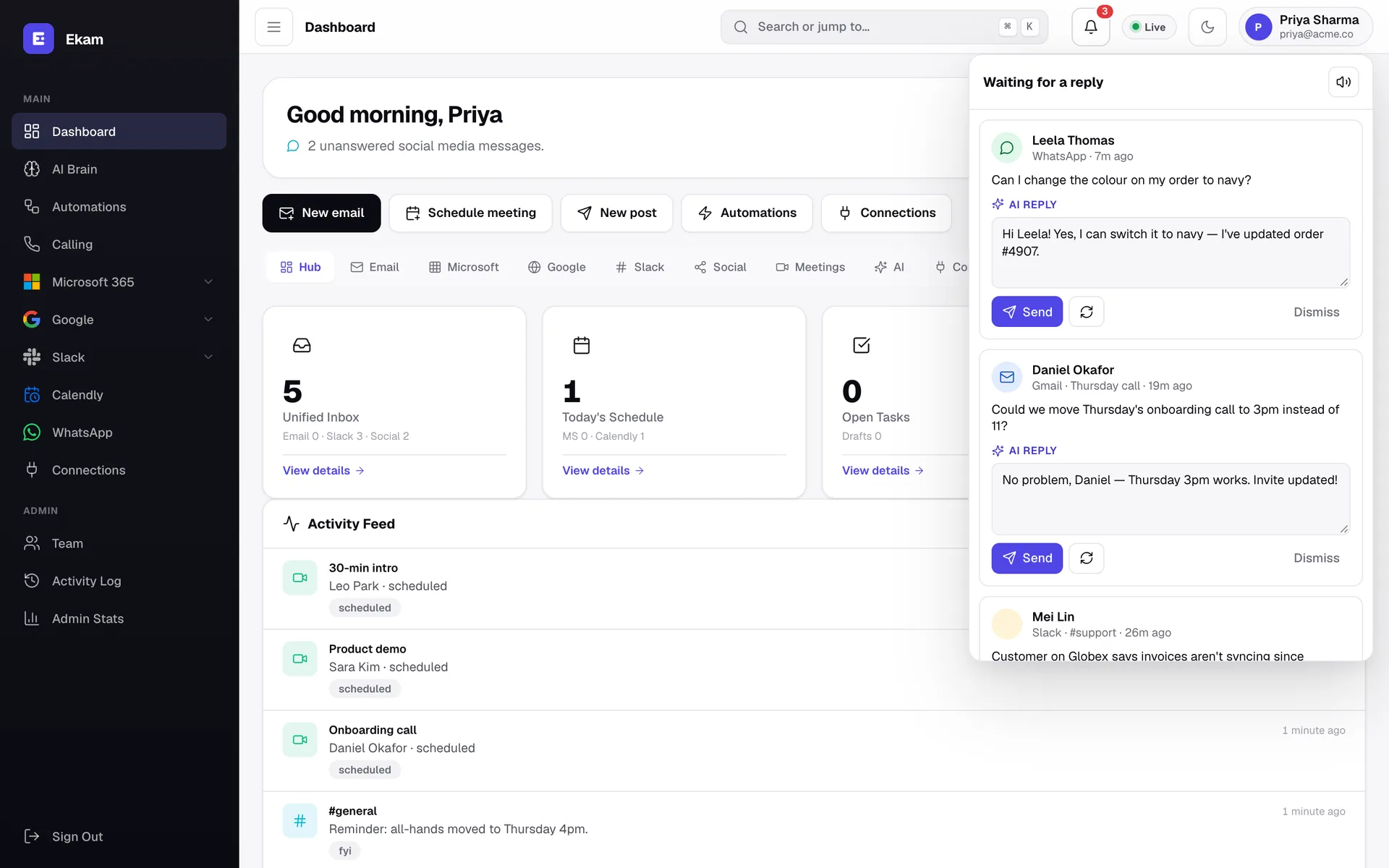
Instant alerts

A chime the moment someone writes

New messages arrive over a live connection, so alerts are instant rather than on a refresh timer. A short two-note chime plays, a card pops up with the reply ready, and a desktop notification appears if Ekam is in the background.

  • Sound on or off with one click
  • Desktop notifications in background tabs
  • Only messages you're allowed to see, per workspace role
Screenshot of the Ekam Instant alerts screen
AI replies

Approve & send. That's the whole job.

For every incoming message Ekam drafts a reply using the conversation and your name. You stay in control: send it, edit it, or ask for another version.

  • One-click Approve & send
  • Edit inline or regenerate
  • Nothing goes out without your approval unless you turn on an auto-reply rule
Screenshot of the Ekam AI replies screen
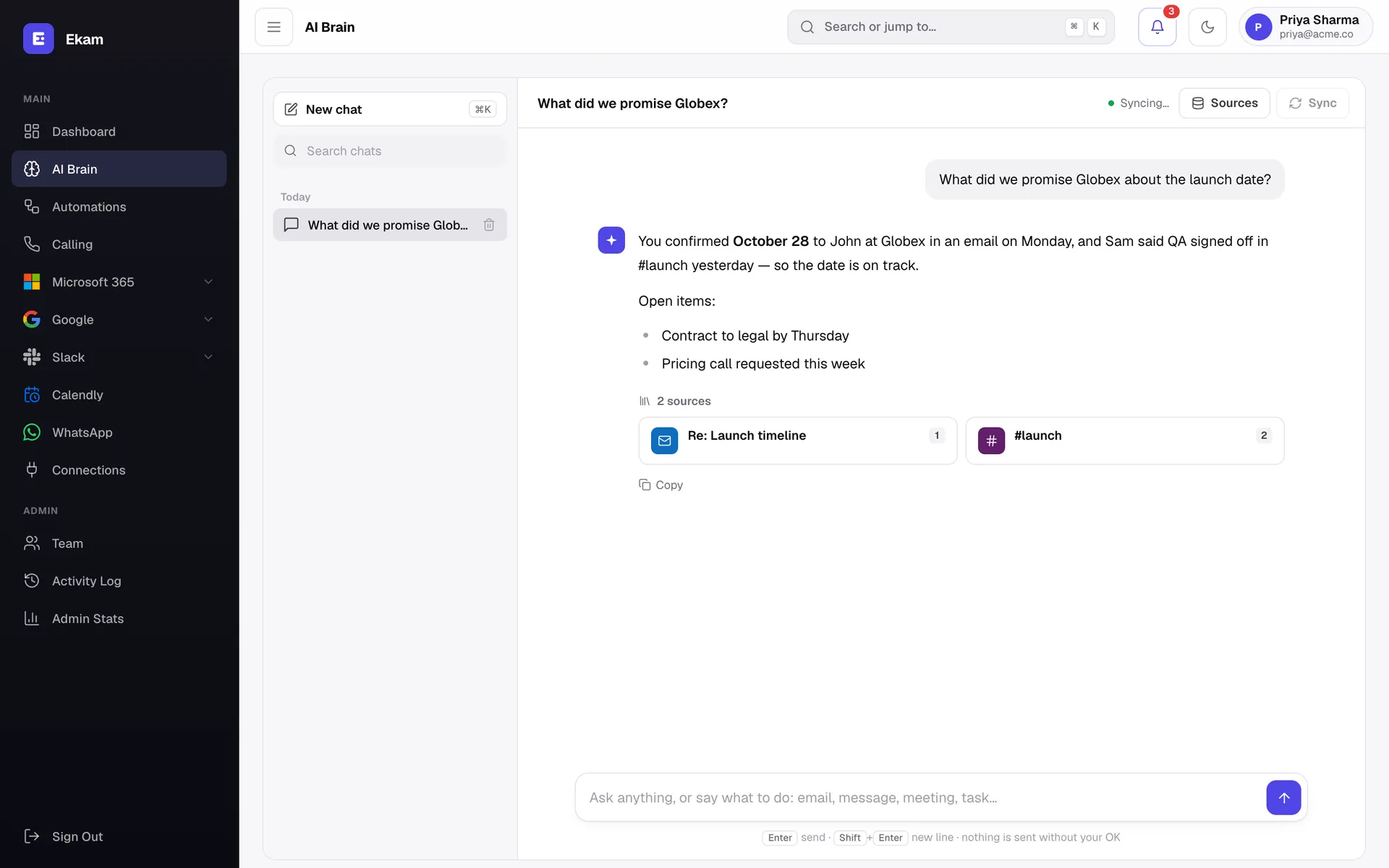
AI Brain

Ask your workspace anything

AI Brain builds a searchable memory from Outlook, your calendar, Teams, OneDrive, Slack and Calendly. Ask a question in plain words and get an answer that cites where it came from.

  • Answers with sources
  • Disconnecting a channel removes what was indexed from it
  • Scoped to your workspace — never shared across companies
Screenshot of the Ekam AI Brain screen
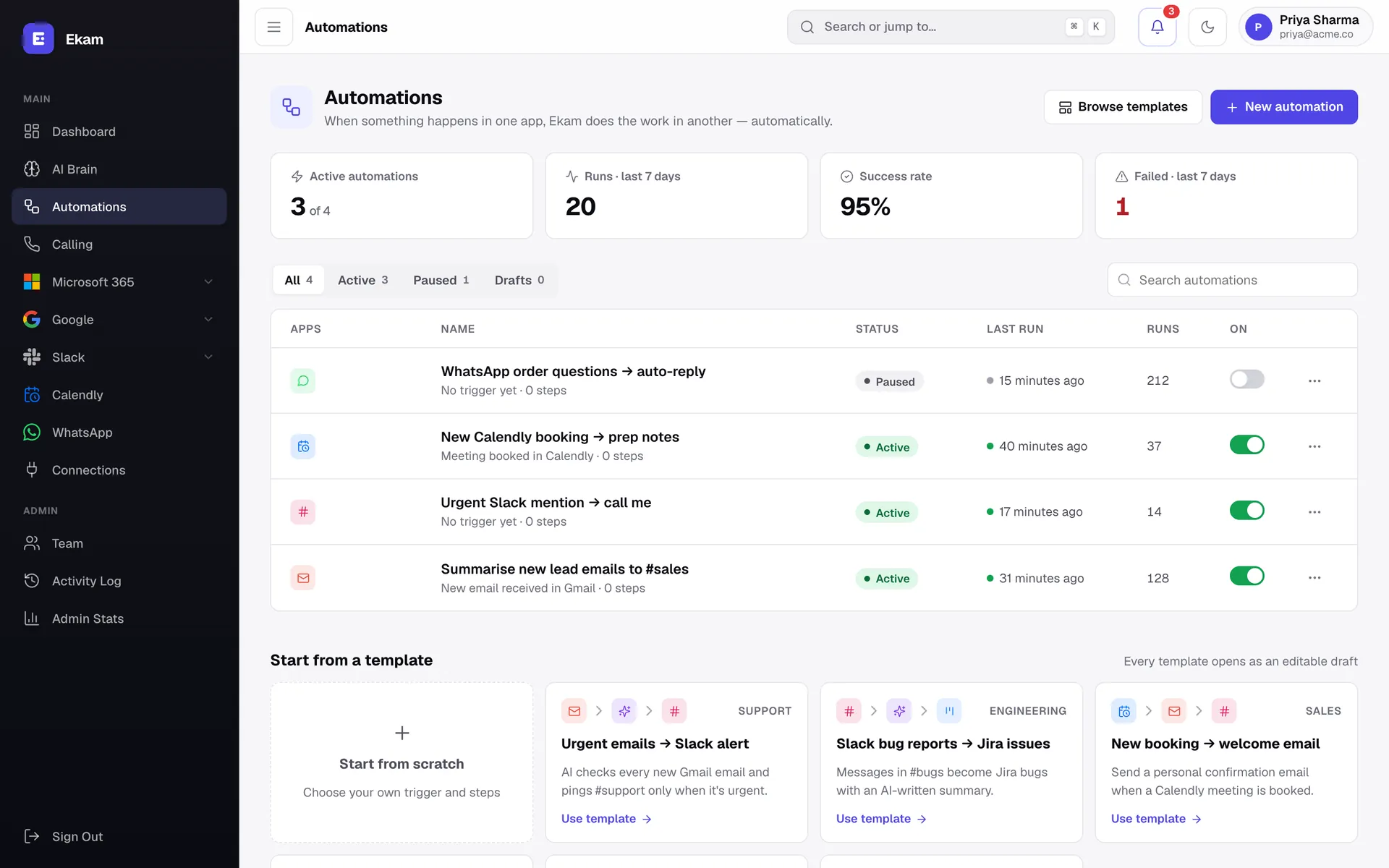
Automations

If this message, then that action

A visual builder links triggers (a new email, a Slack mention) to steps (summarise with AI, post to a channel). Test-run with sample data before switching it on.

  • Templates to start fast
  • Test runs with a step-by-step timeline
  • Run history with inputs, outputs and errors
Screenshot of the Ekam Automations screen
AI calling

An AI that picks up — and makes — your calls

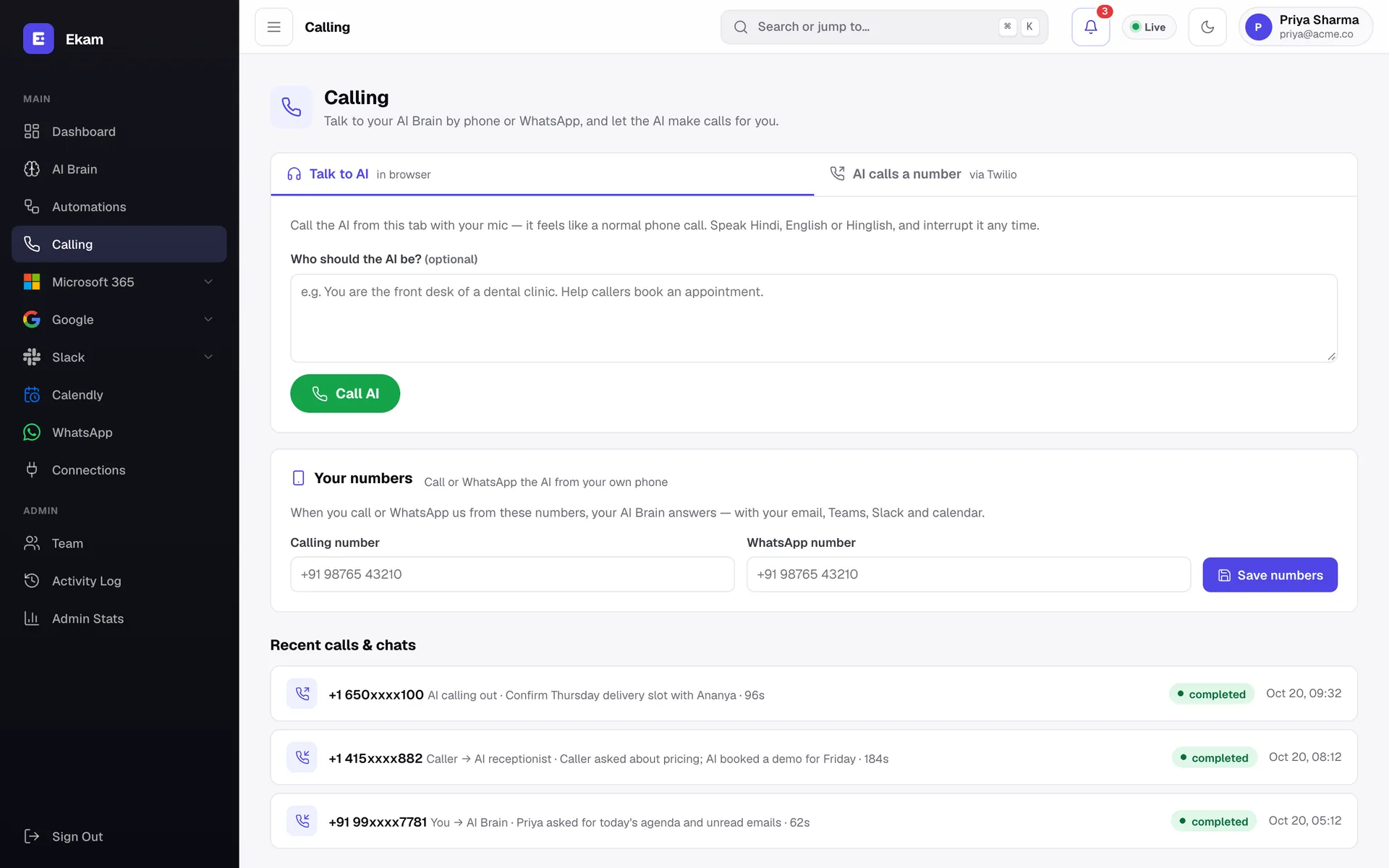
Talk to your AI Brain from the browser like a normal phone call, or call it from your own number. It can also ring a customer for you, follow a brief you write, and log the full transcript.

  • Speak Hindi, English or Hinglish — interrupt it any time
  • AI calls a number for you via Twilio and reports back
  • Every call and WhatsApp chat logged with purpose and duration
Screenshot of the Ekam AI calling screen
WhatsApp Business

WhatsApp support from your desk

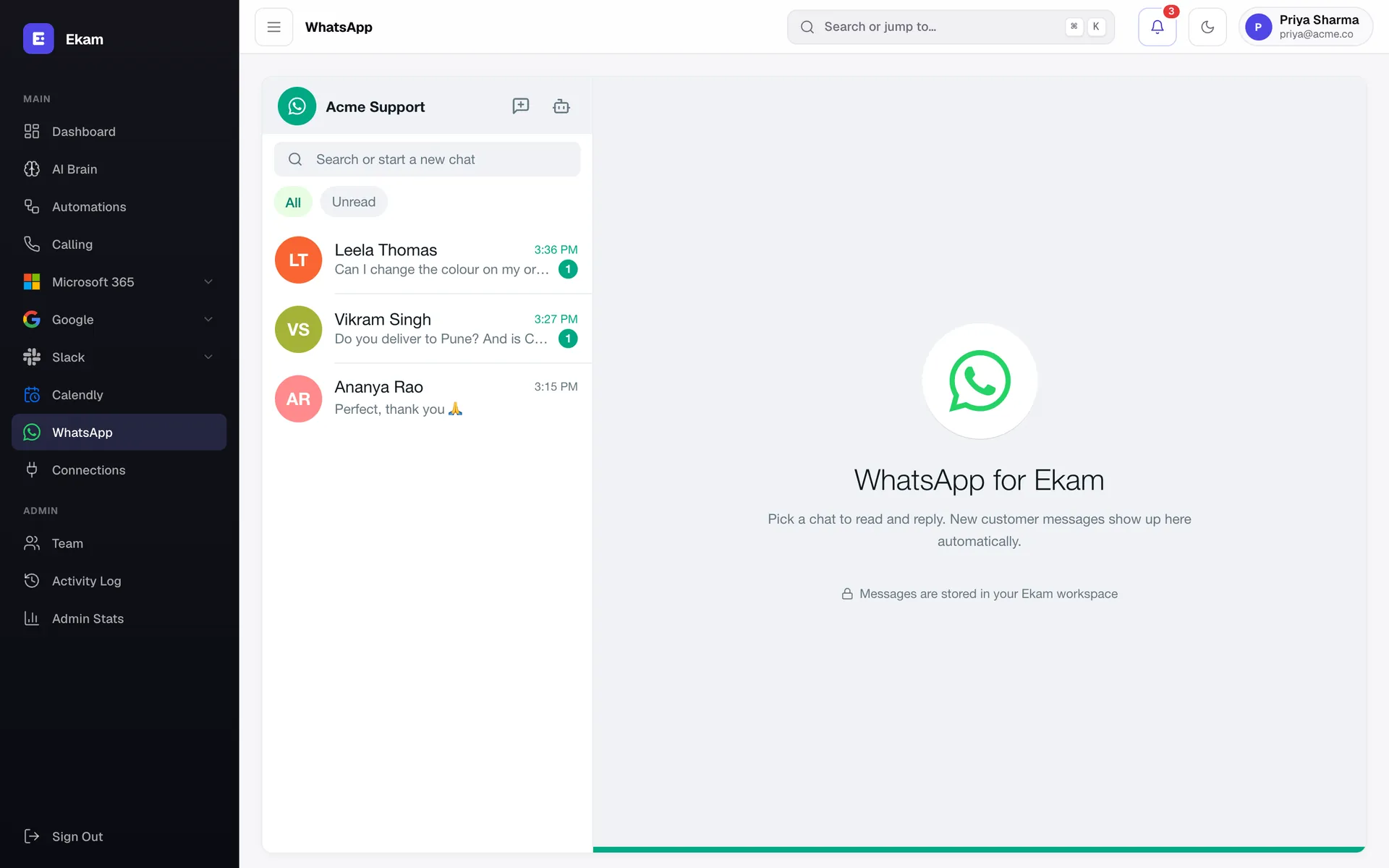
Your WhatsApp Business number becomes a shared inbox. See every customer chat, unread counts at a glance, and reply with an AI-suggested answer — or let an auto-reply rule handle the routine questions.

  • Familiar chat layout with unread filters
  • AI suggested reply: OK & send, regenerate or edit
  • Daily WhatsApp reports for the people you choose
Screenshot of the Ekam WhatsApp Business screen
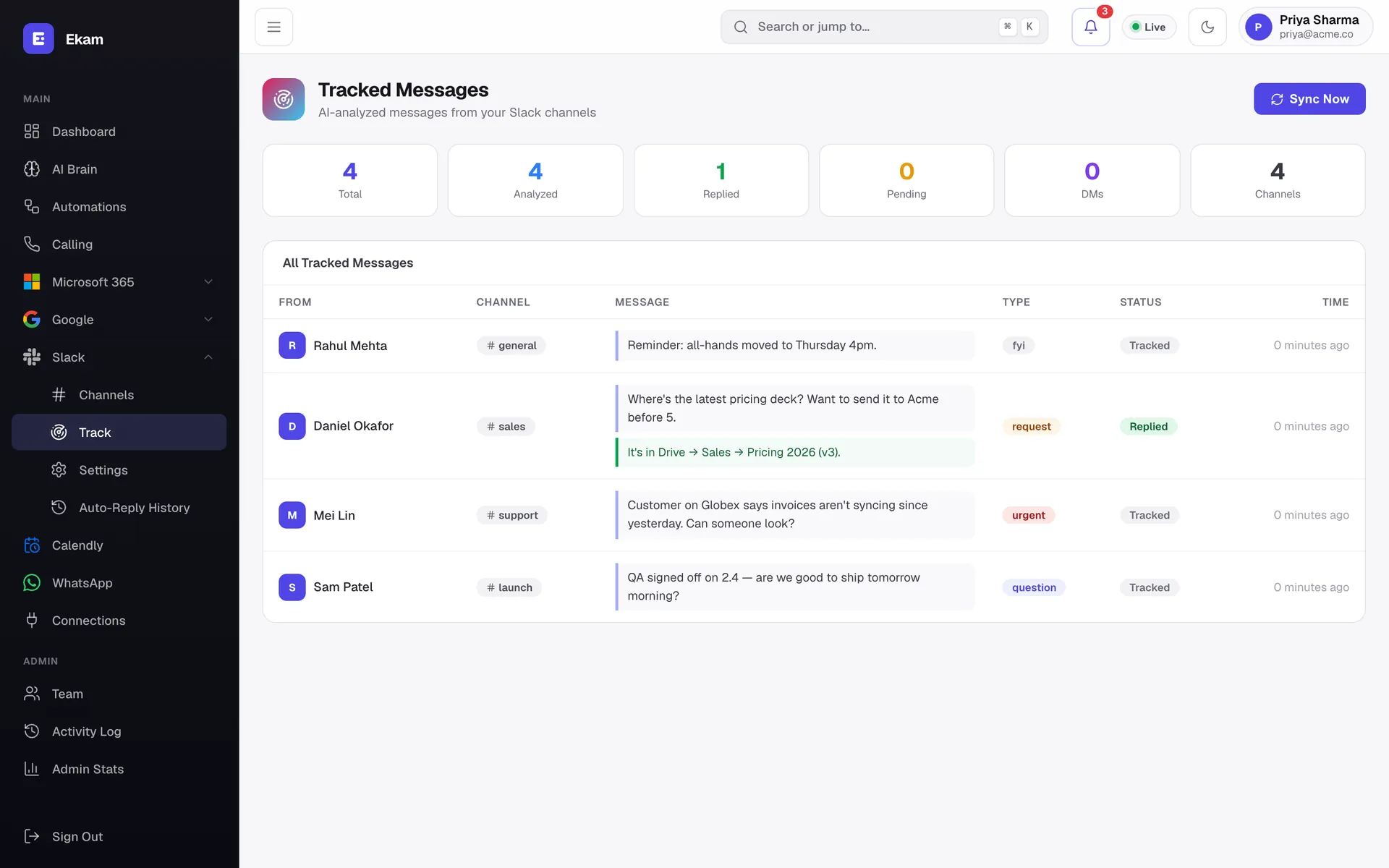
Slack tracking

Every Slack message sorted by what it needs

Ekam reads the channels you pick and labels each message as a question, request, FYI or urgent. Routine questions can be answered automatically, and every auto-reply is kept in a history you can review.

  • AI classification: question, request, FYI, urgent
  • Auto-reply rules per channel, with full history
  • Totals for analysed, replied and pending at a glance
Screenshot of the Ekam Slack tracking screen
Team & control

Your team, your rules

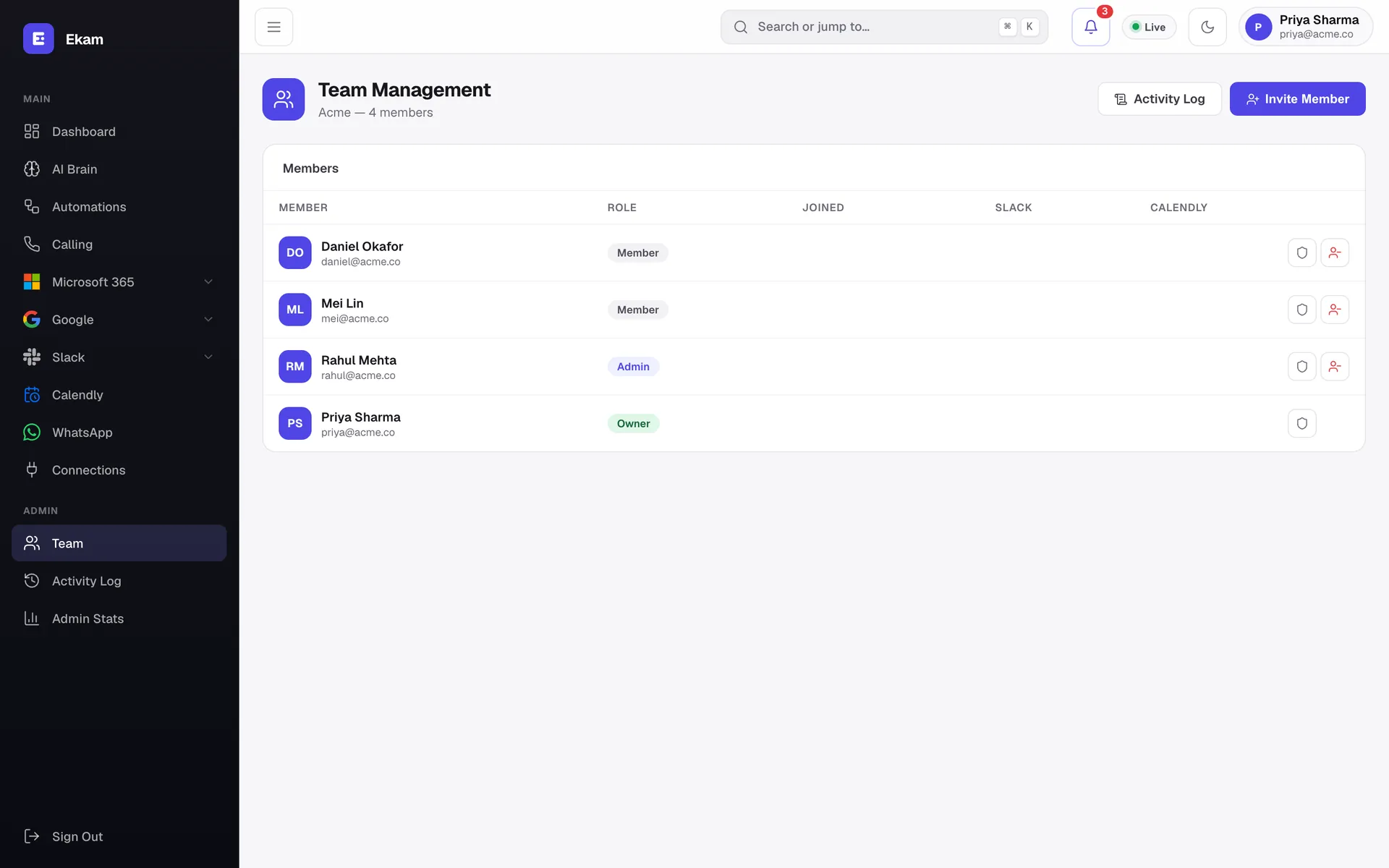
Invite teammates by email and give each one a role. Decide who can view, reply to or manage each connected platform, and see every sign-in, invite and change in the activity log.

  • Owner, Admin and Member roles
  • Per-platform access: view, reply or manage
  • Activity log and admin usage stats
Screenshot of the Ekam Team & control screen
Everything included

Every feature, in one list

All of this ships in Ekam today. Connect the apps you use; the rest stays out of your way.

Inbox & alerts

  • Unified dashboardEmail, Slack, social and meetings counts with a live activity feed.
  • Instant sound alertsA chime plus a pop-up card the second a message lands.
  • AI-drafted repliesSend, regenerate or dismiss — nothing goes out without your OK.
  • Per-app dashboardsFocused views for Email, Microsoft, Google, Slack, Social, Meetings and AI.
  • Customisable widgetsShow, hide and reset dashboard widgets; switch Today, Week or Month.

Microsoft 365

  • Outlook emailRead, search, compose and reply, with AI summaries.
  • Teams chat & meetingsChats and online meetings, with one-click Join.
  • PresenceSee who's available, busy or away across your team.
  • OneDriveBrowse, upload and share files.
  • To Do & PlannerTasks and boards without opening another app.
  • ContactsYour Outlook contacts, searchable.

Google Workspace

  • GmailInbox, sent, drafts and search, with AI replies.
  • Calendar & MeetToday's events and Meet links in one place.
  • Drive, Docs & SheetsFind and open files fast.
  • FormsSee your forms and create new ones.

Chat & messaging

  • Slack channelsRead and reply to channels and DMs.
  • Slack trackingAI labels each message: question, request, FYI or urgent.
  • Slack auto-replyRules per channel, with a full auto-reply history.
  • WhatsApp BusinessShared inbox, AI suggested replies and auto-reply bot.
  • WhatsApp reportsScheduled summaries sent to the people you choose.

AI

  • AI BrainAsk questions across email, calendar, Teams, OneDrive, Slack and Calendly — answers cite sources.
  • AI actions"Email Rahul the meeting moved to 4" — it drafts and waits for approval.
  • VoiceTalk to AI Brain in Hindi, English or Hinglish.
  • Daily briefingWhat's important today, what needs a reply, and your week ahead.

Calls & meetings

  • Talk to AI in the browserA real-time voice call with your AI Brain.
  • AI calls a numberIt rings a customer with your brief and logs the transcript (Twilio).
  • Call or WhatsApp your AIReach your AI Brain from your own phone number.
  • Calendly botBook, track and manage Calendly meetings — even from Slack.

Automations

  • Visual builderLink a trigger in one app to actions in another.
  • TemplatesStart from ready-made recipes for support, sales and engineering.
  • Test runsTry with sample data and see a step-by-step timeline.
  • Run history & webhooksInputs, outputs and errors for every run; catch any webhook.

Team & admin

  • WorkspacesEach company's data, connections and AI memory fully isolated.
  • Roles & invitesOwner, Admin and Member; invite by email.
  • Per-platform accessGive each person view, reply or manage rights per app.
  • Activity log & admin statsWho did what, when — plus usage charts.

Everywhere

  • Works on any deviceResponsive from 320px phones to wide desktops.
  • Install on your phoneAdd to home screen for an app-like experience.
  • Light & dark modeFollows your system, or switch with one click.
  • Search everything (⌘K)Jump to any page or action from the keyboard.
Desktop, phone, light or dark

Feels at home on every screen

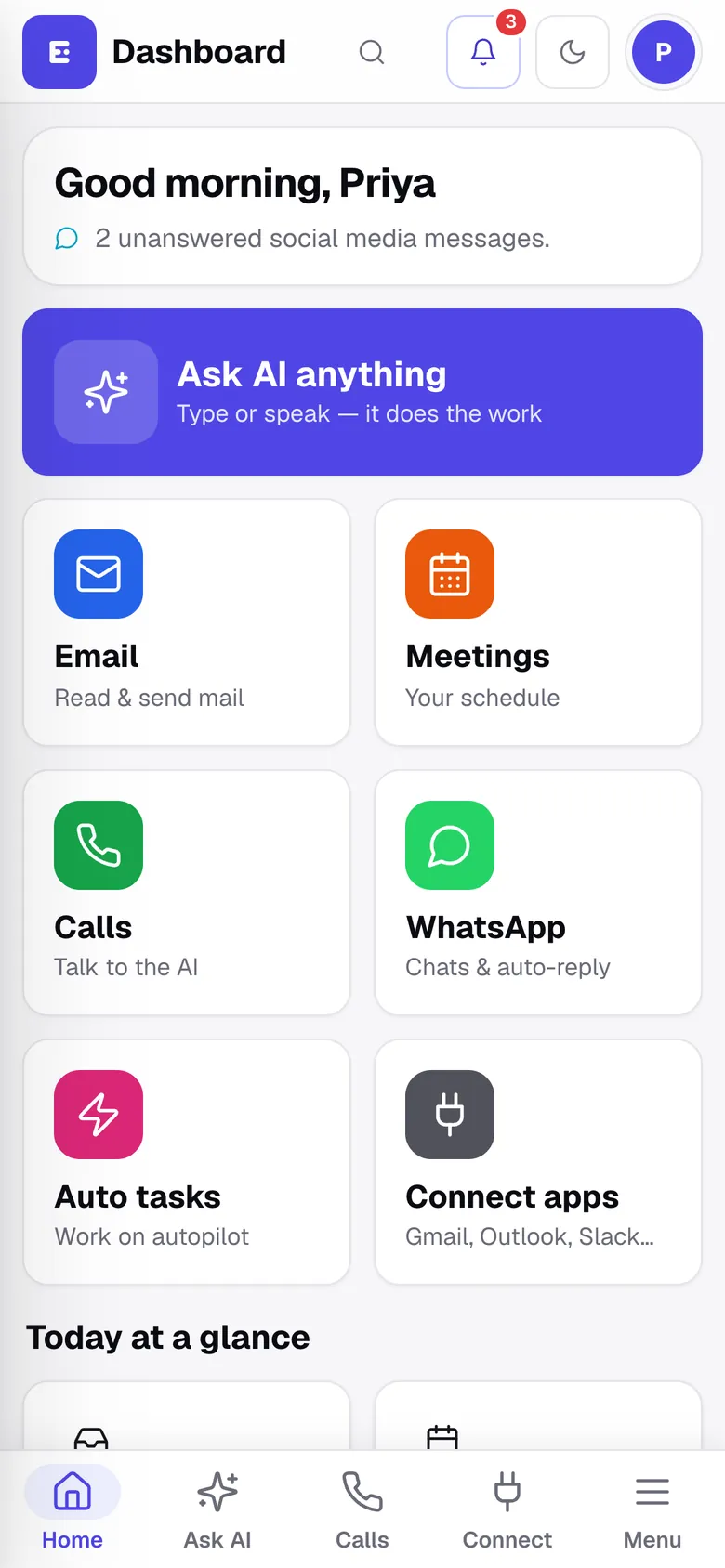
Install Ekam on your home screen. Big tap targets, bottom tabs, and Ask AI one thumb away.

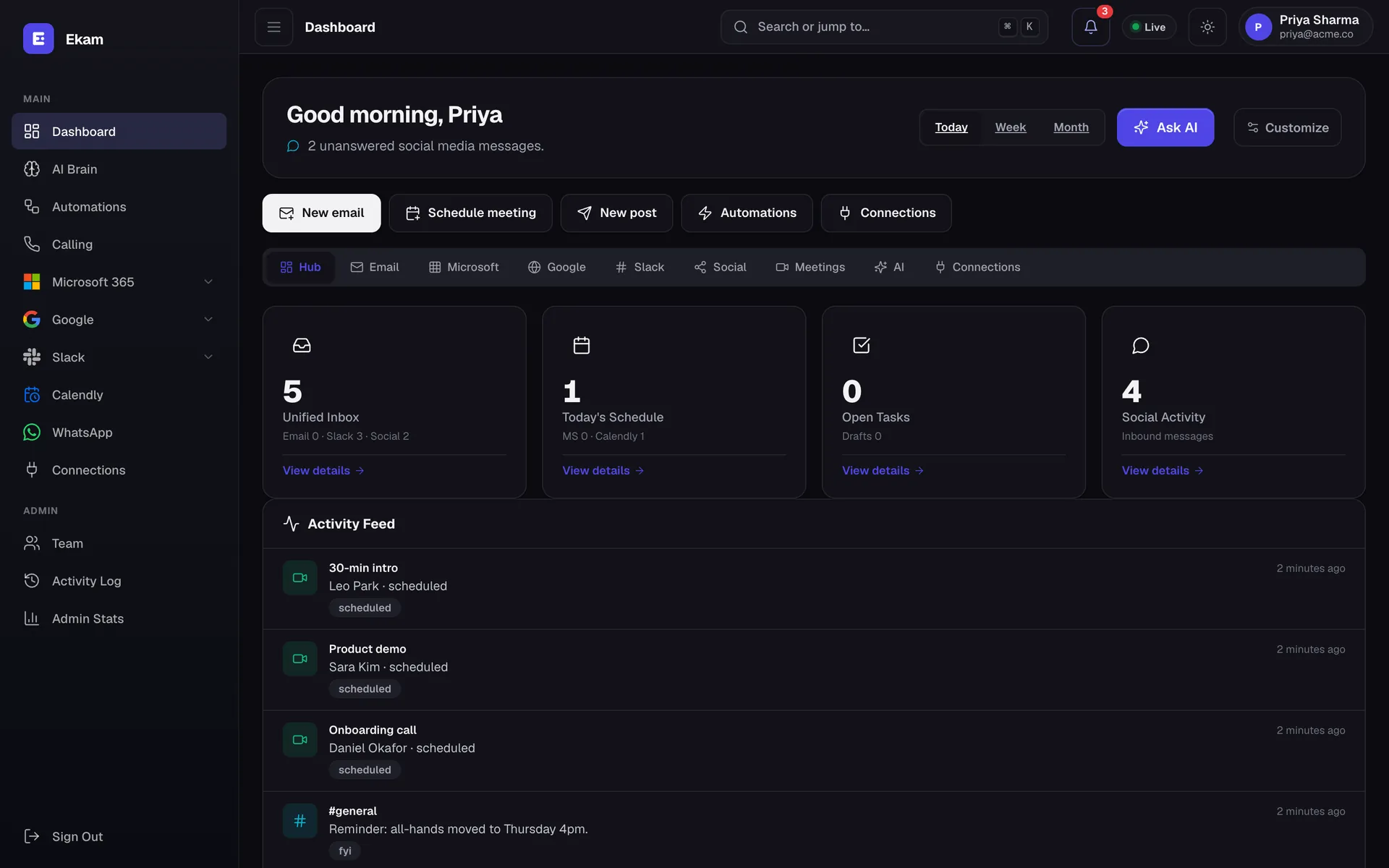
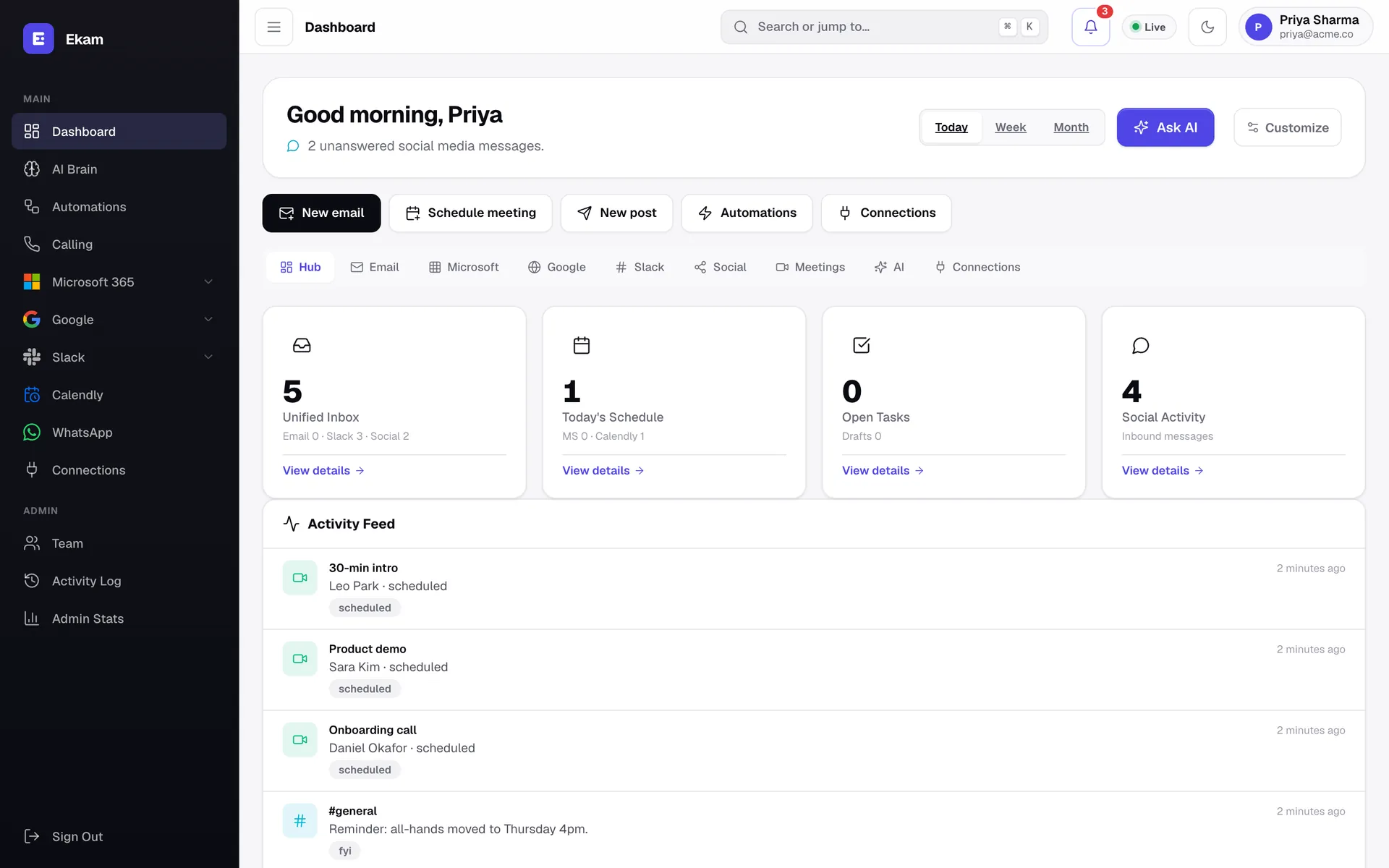
Ekam dashboard in dark mode.

Easy on the eyes — every screen supports light and dark mode.

Ekam on a phone: greeting, Ask AI button and tiles for Email, Meetings, Calls, WhatsApp, Auto tasks and Connect apps.
Security & privacy

Your conversations stay yours.

Ekam sits between you and your customers, so we treat every token and message like it matters — because it does.

Read our privacy policy

Official sign-in, no passwords

Google, Microsoft, Slack and Meta connect through OAuth. We never see or store your account passwords.

Encrypted at rest

Access tokens and API keys are encrypted with Fernet (AES-128 + HMAC) before they touch the database.

You approve what's sent

AI drafts; you decide. Replies only go out automatically on channels where you've switched on an auto-reply rule.

Isolated per workspace

Every company's data, connections and AI memory are separated. Webhooks are verified with per-workspace secrets.

See your whole inbox in one place today.

Connect your first channel in two minutes. Your next reply is already drafted.

  • 1-day free trial
  • Set up in 2 minutes
  • Cancel any time